iVCam and DroidCam alternatives, up to date

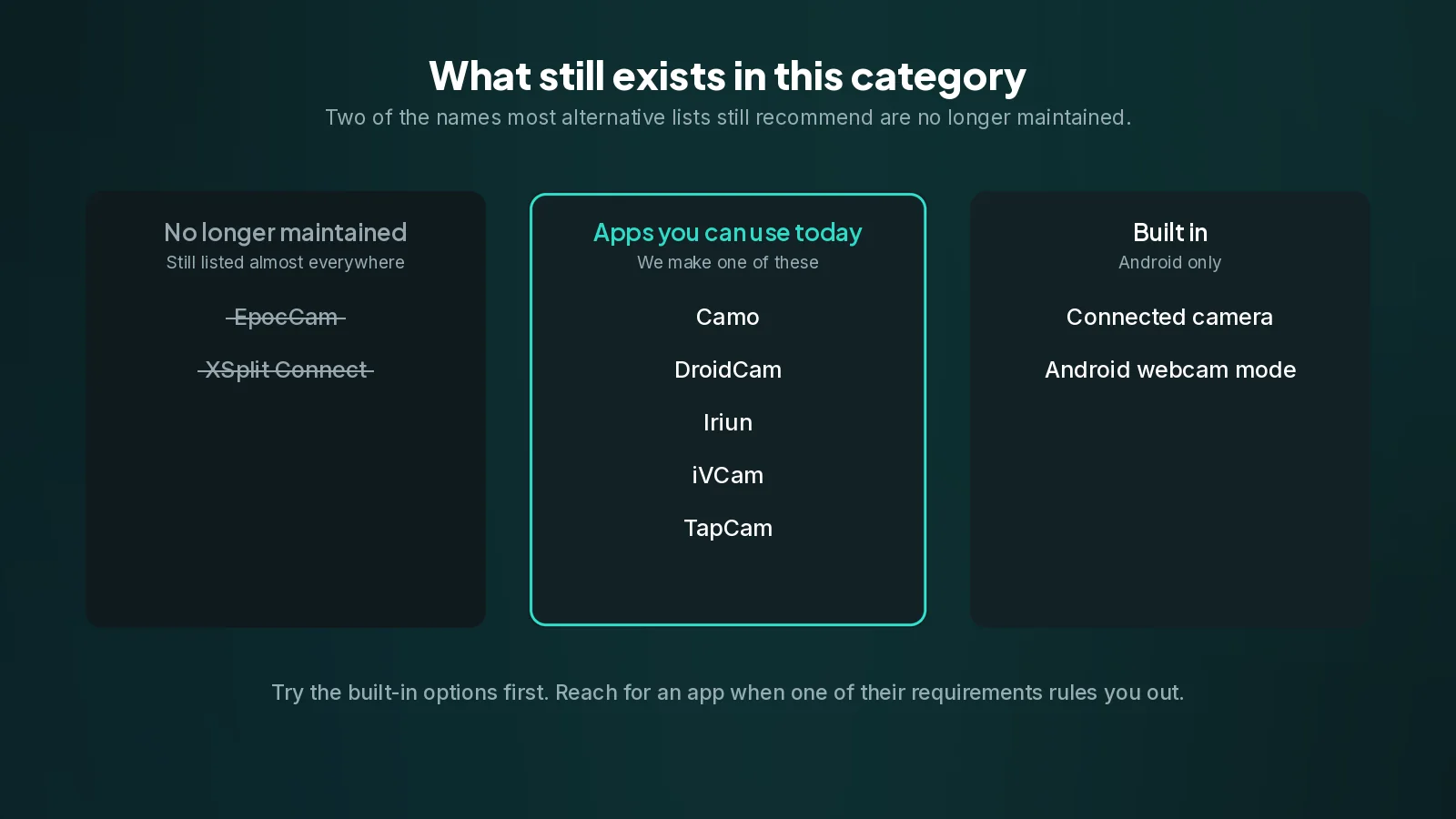
If you searched for an alternative to iVCam or DroidCam and landed on a list, there is a good chance that list is out of date. Two of the apps that still appear near the top of most of them have been discontinued, and one of those has had its own website redirect visitors elsewhere for some time.
This page is a current picture of what actually exists, what each one runs on, and how to choose. It includes our own app, and says so plainly rather than pretending to be a neutral roundup.
The ones that are no longer maintained
Start here, because it saves time.
EpocCam was one of the best known names in this category. Elgato, which acquired it from Kinoni, has discontinued it. The old support articles are still online, which is why it keeps appearing in lists, but it is not a product you should build a setup on today. Kinoni's own site now points at Elgato's hardware.
XSplit Connect: Webcam is also gone. XSplit's page for it now redirects to an article about their VCam product, and that article recommends a different app entirely. The old FAQ and USB setup pages return errors.
If a comparison you are reading lists either of these as a live option, it has not been checked recently, and its other claims deserve the same suspicion.
What is actually available
| App | Phones | Computers | Connection |
|---|---|---|---|
| TapCam | iPhone, Android | Windows | Wi-Fi, USB |
| iVCam | iPhone, Android | Windows | Wi-Fi, USB |
| DroidCam | iPhone, Android | Windows, Linux, macOS (OBS plugin) | Wi-Fi, USB |
| Iriun | iPhone, Android | Windows, macOS, Linux | Wi-Fi, USB |
| Camo | iPhone, Android | Windows, macOS | Wi-Fi, USB |
| Connected camera | Android | Windows 11 | Wi-Fi |
| Android webcam mode | Android 14 and later | Windows, Linux | USB |
The last two are not apps at all, which is why they are worth knowing about.
Connected camera is built into Windows 11 and borrows an Android phone's camera through Phone Link, with nothing to install on the PC. If you have Windows 11 and an Android phone and you are happy with the picture as Microsoft sends it, it is the shortest path there is.
Android webcam mode arrived in Android 14. Plug the phone in with a data cable, choose Webcam in the USB notification, and the phone appears as an ordinary USB camera. Nothing installed anywhere. It is not on every Android 14 phone, and it is cable only.
Try both of those before installing anything. If either one fits, you are done.
How to actually choose
Feature tables are not how people decide this. Four questions are.
What phone do you have? An iPhone rules out both of the no-install options above. That alone settles it for a lot of people.
What is the computer? Most of this category is Windows-first. If you need macOS or Linux on the computer side, the list narrows quickly, and on a Mac with an iPhone you should be using Apple's Continuity Camera instead of any of this.
Where does the phone need to sit? On the desk beside the computer, a cable is the better link, and the no-install options become viable. Across the room on a tripod, you need Wi-Fi and therefore an app.
How does the phone find the computer? This is the question nobody asks in advance and everybody hits afterwards. Most apps here ask the phone to discover the PC on the network, which works beautifully until a guest network, a client-isolating router or a firewall gets involved, and then you get an empty list and no explanation. It is why so much of the documentation for these apps is about networking rather than about cameras.
That last point is the one we designed around. TapCam shows a QR code containing the PC's address, and the phone scans it, so the phone is told exactly where to connect instead of searching for it. Discovery cannot fail because there is no discovery. The address is also printed under the code, which is what you use to check that both devices really are on the same network when something else is wrong.
About this list
We make one of the apps on it, so treat the framing accordingly: what we can honestly offer you is accuracy about the others and clarity about what we do differently, not a neutral verdict.
What we have tried to do is state platform support and connection methods, which are facts you can check, and leave out a column comparing what each app withholds from its free version. Those details change without notice, and a page that listed everyone else's restrictions while staying quiet about its own would be the dishonest half of a comparison. If a free version matters to your decision, the honest advice is to install the two or three that fit your platforms and see which one you keep.
TapCam is free to download and use on Windows 10 and 11, with a one-time PRO purchase and no subscription.
The short version
- Windows 11 and an Android phone, happy with the default picture? Use the connected camera. Nothing to install on the PC.
- Android 14 phone and a cable to hand? Use the built-in webcam mode. Nothing to install.
- An iPhone, or Windows 10, or the phone needs to be across the room, or you want control over the picture? You need an app, and any of the live ones above will do the job. Pick on platform support and on how the phone finds your PC.
- A Mac with an iPhone? Continuity Camera, built in, and none of this applies.
Frequently asked questions
Is EpocCam still available?+
No. Elgato has discontinued it. Its old support articles are still online, which is why it keeps appearing in comparison lists, but it is not something to build a setup on today.
What happened to XSplit Connect: Webcam?+
It is gone. XSplit's page for it redirects to an article about their VCam product, and that article recommends a different app. The old FAQ and USB setup pages return errors.
Is there a way to do this with no app at all?+
Two, both Android only. Windows 11 can borrow an Android camera through Phone Link, and Android 14 added a USB webcam mode that needs nothing installed on either side. Try both before installing anything.
What should I actually compare?+
Which phone you have, which computer, where the phone needs to sit, and how the phone finds the computer. That last one is what people hit afterwards: most apps ask the phone to discover the PC on the network, which fails on guest networks and client-isolating routers.
Which is best for a Mac?+
With an iPhone, Apple's Continuity Camera, which is built in and needs no app. Most of this category is Windows-first, so on macOS the list of options is much shorter.